Creating and configuring share links
Share links give you precise control over how someone watches your video. Here's how to set one up.
Watch: sending a private screener
About two minutes: a screening link for a festival, email invites, what the viewer sees, their note, and switching the link off.
The video's script is available to download, so it can be translated for better understanding: as subtitles with timings (.srt) or as plain text (.txt).
From your video's edit page, open Share links. Fill in the form and select Create share link. Your links are listed above the form.
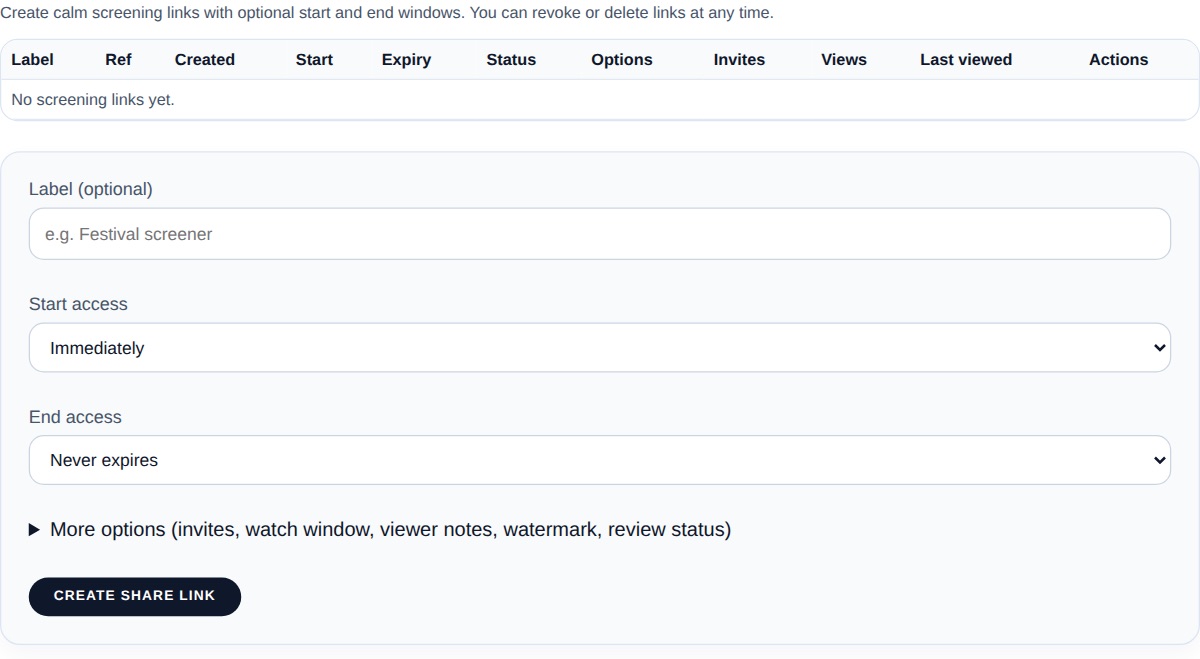
Most links only need these:
- Label - a private name for your own reference, not shown to the viewer
- Start access / End access - when the link starts and stops working (immediately and never, unless you choose dates)
The rest are under More options:
- Invite viewers by email - send the link to named people so you can see who watched
- Expire after first completed viewing - the link stops working once the film has been watched through
- Enable watch window after first play - the viewer has a set time (for example 24 hours) from first play to finish watching
- Allow viewer notes (Creator plan and up) - viewers you invite by email can leave written feedback, see Collecting screening notes
- Show screening watermark overlay - a subtle on-screen watermark (on by default)
- Review status - Pending, In review or Approved, for your own tracking
You can revoke any link at any time from the share links list - access is cut off immediately.
For invite-only screenings where you want to track individual viewers, see Invite-only screening. To collect written feedback from viewers, see Collecting screening notes.